 Location :
Orlando, FL, USA
Location :
Orlando, FL, USA +1 (407) 714-1616
 info@biz4group.com
 AI Summary Powered by Biz4AI
- Build an AI app around a clear user problem and choose AI capabilities that improve the core experience.
- Select the right AI approach, whether that means an AI API, RAG, traditional ML, computer vision, voice AI, or an agentic workflow.
- Follow a structured AI app development process covering architecture, data, integrations, security, testing, deployment, and scalability.
- AI app development costs typically range from $20,000–$70,000 for an MVP, $70,000–$120,000 for a mid-level app, and $120,000–$150,000+ for an advanced app.
- Building an AI app goes beyond model selection. Biz4Group, an AI product development company, brings hands-on experience building AI applications across conversational AI, voice, personalization, computer vision, and automation.
Can you really build an AI app by simply connecting an AI model to your product?
You can build a demo that way. But building a production-ready AI application is another matter. The real work starts when the AI needs to understand context, trigger application actions, work with external services, and remain reliable and cost-efficient as usage grows.
The opportunity is substantial. Gartner forecasts $2.59 trillion in worldwide AI spending in 2026, up 47% year over year.
At Biz4Group LLC, we learned this firsthand while building Hey Benson, an AI-powered social planning application. While building the app, the challenge wasn’t just making the AI understand a user’s request. We had to connect that intent to real actions such as event creation, participant management, invitations, group chats, and updates. We also found that third-party services could quickly affect operating costs, prompting us to rethink parts of the recommendation and communication architecture.
Those are the practical decisions that turn AI capabilities into a useful application. But first, it helps to understand what AI actually brings to an app and what it can do, from understanding language and generating content to recognizing images, automating tasks, and personalizing user experiences.
What Is AI in App Development and What Can It Do?
AI in app development means embedding AI capabilities into an application’s existing user experience, data, and workflows so the app can perform tasks that would otherwise require manual input or rule-based logic. Depending on the use case, that can include generating content, understanding language, recognizing images, personalizing recommendations, predicting outcomes, or turning user data into actionable insights.
The important question is what the AI should actually do and how that capability should connect to the rest of the application.
Common AI capabilities include:
- Generative AI: Creates or transforms text, images, audio, code, or other content.
- Machine Learning: Detects patterns and makes predictions from structured or behavioral data.
- Natural Language Processing: Enables applications to understand, classify, summarize, or respond to human language.
- AI Computer Vision: Analyzes images and video for tasks such as object detection, recognition, and visual inspection.
- AI Recommendations: Uses user behavior, preferences, or contextual data to personalize content, products, or actions.
- AI Automation: Connects AI-driven decisions with application workflows, APIs, and business processes.
What Does This Look Like in a Real AI Application?
SweatJoy, a wellness application built by Biz4Group, is a practical example of how AI can become part of the product experience rather than exist as a standalone feature. The application combines user inputs such as mood, sleep, hydration, and activity with NLP-based mindful sessions and personalized recommendations. Behavioral analytics then turn those inputs into trends and progress insights.
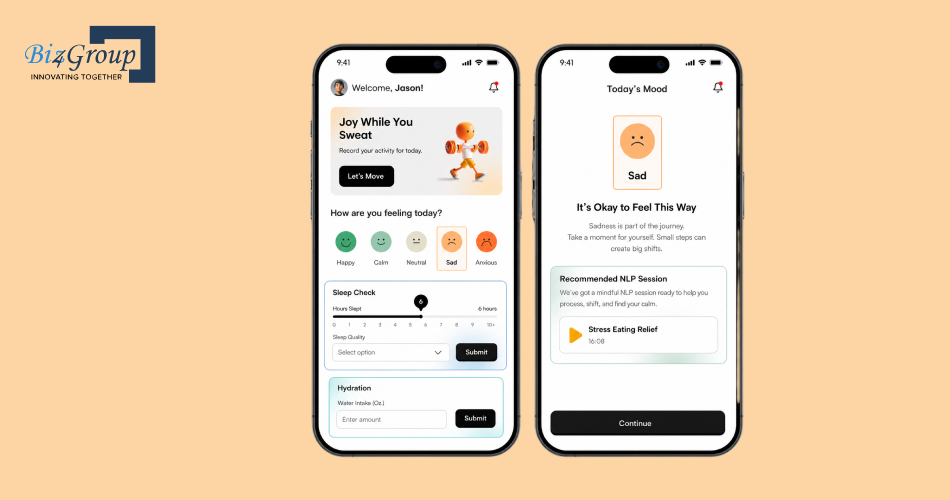
Building it also highlighted several practical considerations that matter when you build an AI app:
- Personalization depends on quality data: User inputs had to be structured so the application could use them consistently for recommendations and insights.
- AI features need to fit the product workflow: NLP-based sessions were connected to tracking and recommendation experiences rather than treated as an isolated AI tool.
- Data volume affects architecture: SweatJoy needed to handle growing wellness logs, meal data, analytics, and media without degrading performance.
- AI-enabled experiences still require conventional engineering: Database optimization, efficient API responses, caching, and streamlined rendering were necessary to maintain application performance as data volume increased.
This is the distinction worth keeping in mind throughout AI app development, the model is only one component. The value comes from how well the AI capability works with the application’s data, business logic, interface, integrations, and infrastructure.
What Are the Industry-Wise Use Cases for Building an AI App?
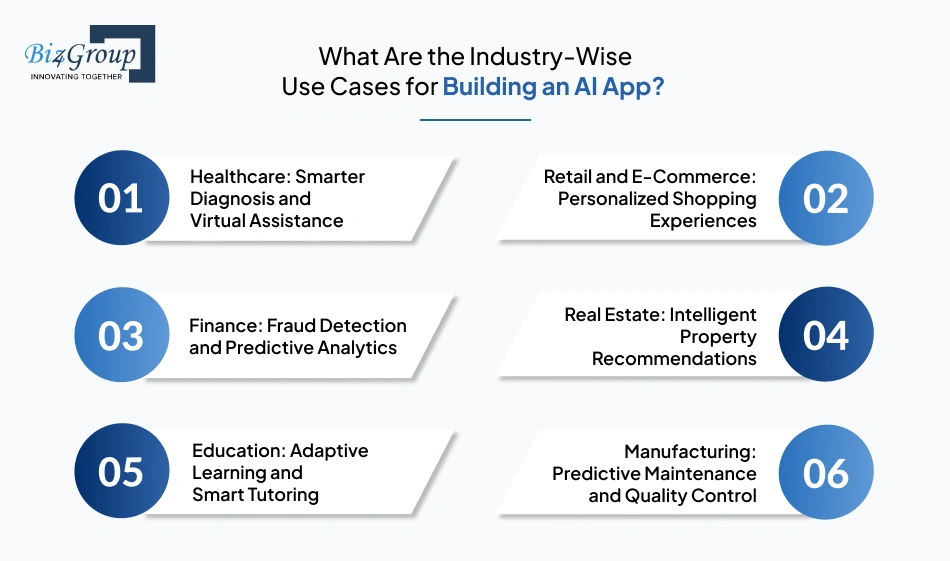
The potential of AI app development extends across every major industry. When you build an AI app tailored to your business goals, you can enhance user experience, automate workflows, and make smarter decisions in real time.
Let’s explore how different sectors are integrating AI into their apps to achieve measurable results.
1. Healthcare: Smarter Diagnosis and Virtual Assistance
In healthcare, developing an AI-powered app can transform patient care through predictive analytics, image recognition, and virtual health assistants. These apps help doctors diagnose faster, predict patient risks, and improve treatment outcomes.
For example: Buoy Health and Ada use AI chatbots to assess user symptoms, guide them toward proper care, and reduce unnecessary clinic visits.
2. Retail and E-Commerce: Personalized Shopping Experiences
Retailers are building AI apps that leverage customer data to deliver highly personalized shopping journeys. AI algorithms track browsing history, preferences, and purchase behavior to recommend products users are most likely to buy.
For instance: Amazon and Sephora use AI-driven recommendation engines to suggest products in real time, boosting conversions and improving user engagement.
3. Finance: Fraud Detection and Predictive Analytics
In the financial sector, AI in mobile app development helps detect fraud, automate support, and enhance user security. AI models analyze transaction data to identify anomalies and prevent breaches before they occur.
For example: PayPal and Chase Bank deploy AI systems that detect unusual spending behavior, verify identities, and alert users instantly to suspicious activity.
4. Real Estate: Intelligent Property Recommendations
When you build an app with AI integration, real estate companies can provide smarter property recommendations and accurate market insights. AI models evaluate buyer intent, pricing trends, and location data to suggest ideal listings.
For instance: Zillow and Redfin use AI to estimate property values, predict housing demand, and guide users toward the best investment options.
5. Education: Adaptive Learning and Smart Tutoring
Developing an AI app in education helps personalize the learning journey for every student. AI-driven tools assess skill levels, track performance, and adjust lesson difficulty accordingly.
For example: Duolingo and Coursera rely on AI algorithms that recommend study materials, set progress goals, and provide real-time feedback to enhance learning outcomes.
6. Manufacturing: Predictive Maintenance and Quality Control
Manufacturers benefit from developing AI-powered apps that improve equipment reliability and product quality. AI can predict machine failures before they happen, reducing downtime and maintenance costs.
For instance: General Electric’s Predix platform analyzes sensor data from industrial machines to detect early signs of malfunction, allowing proactive maintenance.
These real-world examples demonstrate that building an AI app is not limited to any single industry, it’s a universal catalyst for digital transformation. By identifying how AI in mobile app development impacts your field, you can craft intelligent solutions that scale efficiently and deliver exceptional value to users.
What Features Should You Include When You Build an App With AI Integration?
Don’t treat AI capabilities as a checklist. Choose features based on the problem your app needs to solve, the data available to support them, and how directly they improve the user journey. A chatbot may be valuable for customer support but unnecessary for a fitness app, while personalization or predictive analytics could have a much larger impact there.
|
AI Feature |
What It Does |
Best Suited For |
|---|---|---|
|
AI Chatbots & Virtual Assistants |
Handles conversations, answers questions, retrieves information, and guides users through tasks |
Customer support, banking, healthcare, SaaS, e-commerce |
|
Generative AI |
Generates or transforms text, images, documents, code, and other content |
Content platforms, productivity apps, marketing, education, SaaS |
|
Assists users inside existing workflows and suggests actions or content |
Enterprise software, developer tools, productivity, CRM |
|
|
Recommendation Engines |
Suggests products, content, services, or actions using user behavior and context |
E-commerce, media, fitness, travel, entertainment |
|
Identifies patterns and forecasts likely outcomes |
Finance, healthcare, logistics, sales, operations |
|
|
Natural Language Processing |
Understands, classifies, summarizes, and extracts information from text |
Search, document processing, customer support, knowledge platforms |
|
Computer Vision |
Interprets images and video for detection, classification, or analysis |
Healthcare, retail, manufacturing, security, real estate |
|
Voice AI |
Converts speech to text and enables voice-based interaction |
Accessibility, assistants, field services, automotive, healthcare |
|
Personalization |
Adapts content, recommendations, interfaces, or experiences to individual users |
Fitness, e-commerce, education, media, wellness |
|
Intelligent Automation |
Uses AI to interpret inputs and execute or route business tasks |
Operations, finance, HR, customer service, enterprise workflows |
|
Fraud & Anomaly Detection |
Detects unusual behavior, transactions, or system activity |
Banking, fintech, insurance, e-commerce, cybersecurity |
|
Sentiment & Emotion Analysis |
Identifies sentiment or emotional signals in user-generated content |
Customer experience, social platforms, market research |
|
Visual Search |
Uses images as search inputs to find visually similar products or objects |
E-commerce, fashion, real estate, retail |
|
Real-Time Translation |
Translates conversations or content between languages |
Travel, education, communication, global SaaS |
|
AI-Powered Document Processing |
Extracts, classifies, summarizes, and validates information from documents |
Legal, healthcare, finance, insurance, enterprise |
If you are deciding which AI features belong in your app, start with the user outcome they need to improve. The right feature depends on the workflow, interaction model, and technical demands behind it.
For example, real-time AI requires very different infrastructure from a recommendation engine or document assistant. Classroom Sync, developed by Biz4Group, shows how even a focused AI feature can influence the underlying architecture. The education application combines real-time transcription, multilingual translation, anonymous feedback, session recording, confusion tracking, and teacher engagement analytics.
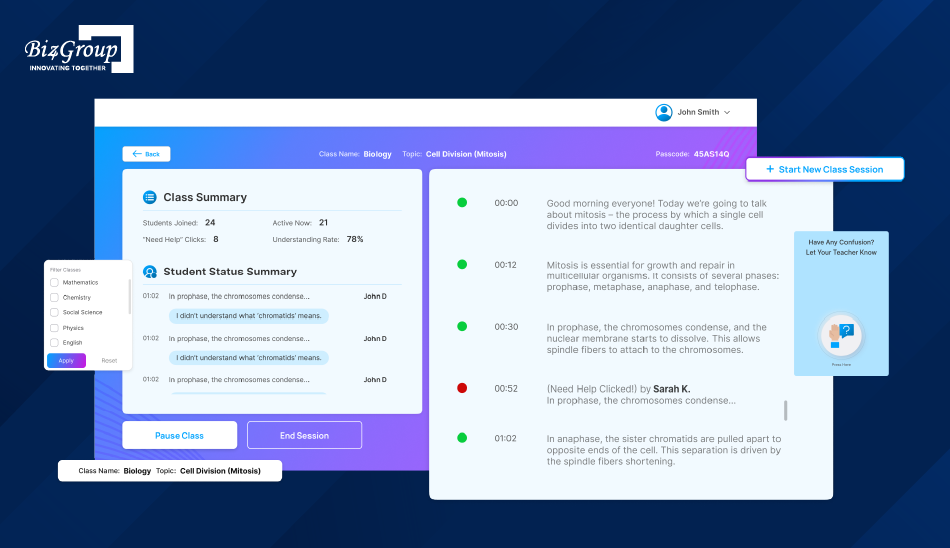
Because transcription had to work in real time for 30+ users per class with a target latency below two seconds, the implementation used Deepgram for speech-to-text alongside WebSockets, buffering, and backend scaling to keep interactions responsive.
The takeaway is practical, when selecting AI features, consider the infrastructure each feature demands alongside the value it creates.
Could Your App Be Smarter With Fewer Features?
The right AI capabilities can create more value without making the product harder to use.
Connect with Biz4GroupWhat Technology Stack Do You Need to Build an AI App?
The right technology stack gives an AI app the infrastructure it needs without adding unnecessary engineering overhead. A lightweight application may only need an existing frontend and backend connected to a model API, while a more demanding product could require RAG, vector search, tool calling, dedicated inference, security controls, and observability. The stack should therefore be shaped by the AI capability, data, inference requirements, security expectations, cost targets, and projected scale.
That approach became particularly relevant while developing Valinor at Biz4Group. The AI-powered documentary application enables users to preserve life stories through voice-based storytelling and interact with an AI representation of those memories.
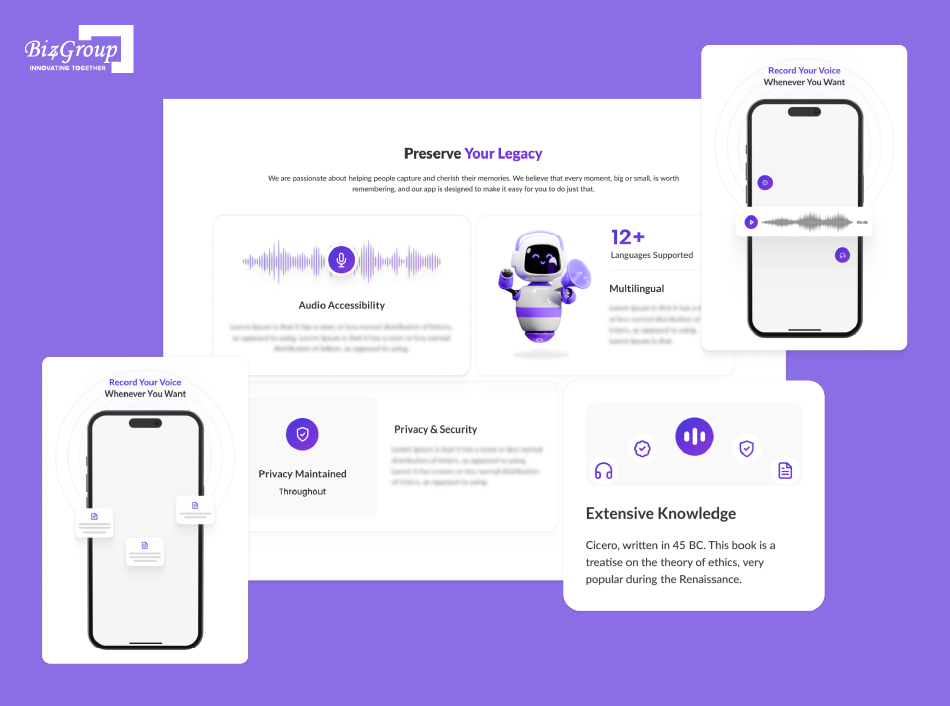
Supporting that experience required conversational AI, speech-to-text, NLP, sentiment analysis, text-to-speech, vector data, and real-time communication, resulting in a stack that included React, Next.js, Python, FastAPI, PostgreSQL, Milvus, Socket.IO, Docker, AWS, and ChatGPT.
The project reinforced a practical lesson for our team: technology choices need to follow the product’s workload and user experience. A voice-driven application like Valinor has very different infrastructure needs from a recommendation engine, document assistant, or computer vision app, so the stack should be built around the capabilities the product actually needs.
Let’s explore the recommended tech stack to execute your idea.
|
Layer |
Recommended Technologies |
Best Suited For |
|---|---|---|
|
Frontend |
React, Next.js, React Native, Flutter, Swift, Kotlin |
Web and mobile AI experiences with Next.js development and more |
|
Backend |
Python, FastAPI, Node.js, TypeScript, Java, Go |
APIs, business logic, AI integrations with Node.js development, Python development and more |
|
OpenAI, Anthropic, Google Gemini, AWS Bedrock, Azure AI, open-source models |
Generation, reasoning, multimodal AI, classification |
|
|
RAG & Search |
Embeddings, pgvector, Pinecone, Qdrant, Weaviate, OpenSearch |
Private knowledge, document search, grounded responses |
|
AI Orchestration |
Provider SDKs, LangChain, LlamaIndex, custom workflows |
Prompts, retrieval, tools, model workflows |
|
ML & Custom Models |
PyTorch, scikit-learn, XGBoost, Hugging Face |
Prediction, classification, recommendations, fine-tuning |
|
Function/tool calling, agent frameworks, MCP-compatible integrations |
Multi-step tasks and business-system automation |
|
|
Cloud & Inference |
AWS, Azure, Google Cloud, managed AI APIs, GPU infrastructure |
Deployment, scaling, inference |
|
Data Layer |
PostgreSQL, Redis, object storage, vector databases |
Application data, caching, embeddings, documents |
|
Evaluation & Monitoring |
LLM evaluations, tracing, logs, application metrics |
Quality, latency, failures, usage, cost |
|
Security |
IAM, OAuth, encryption, secrets management, guardrails |
Data protection and controlled AI access |
One important rule: don’t train a custom model simply because you’re building an AI application. Start with an existing model or API, then introduce RAG, fine-tuning, custom ML, or self-hosted inference only when the application’s requirements justify the additional complexity.
How to Build an AI App? A Step-by-Step Development Process
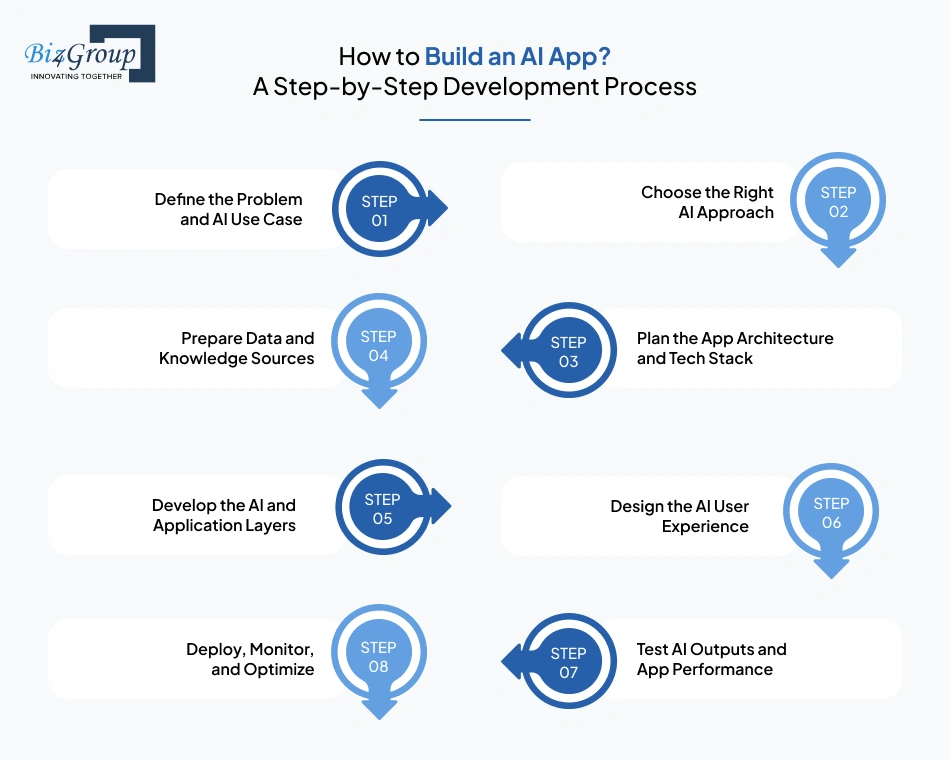
Building an AI app should not start with choosing a framework or training an AI model. Start with the job you want AI to perform, then work backward to the architecture, model, data, and infrastructure required to do it reliably. The right approach also depends on whether you are building a generative AI application, predictive ML system, AI agent, computer vision product, or adding AI to an existing application.
A good way to understand the development process is to look at how the decisions come together in a real AI application. With Quantum Fit, the goal was to build a personal development app that could help users set goals, track habits, understand their progress, and receive personalized guidance across six areas of well-being.
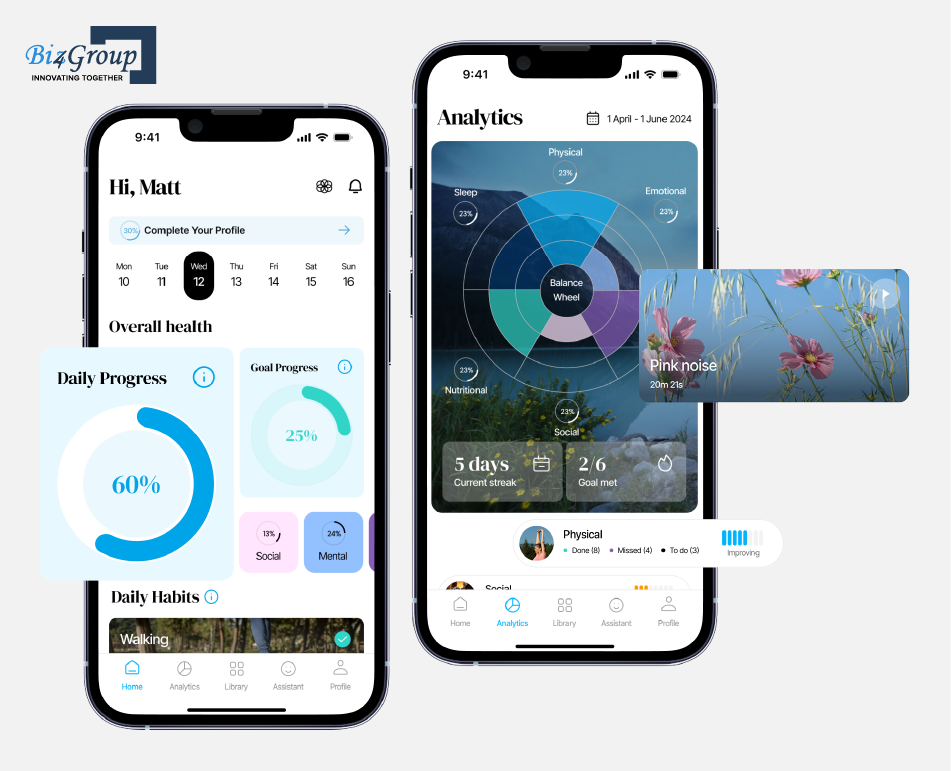
The development involved several decisions that mirror the steps outlined above:
- Defined the AI use case: Personalization was central to the product, with AI using user inputs, habits, and progress to generate development plans and recommendations.
- Designed the application architecture: React Native supported the mobile experience, while Node.js, Express, MySQL, and Python handled the application, data, and AI layers.
- Integrated the AI capability: ChatGPT 4o powered the conversational experience, including goal setting, personalized advice, and user support.
- Addressed production costs: Personalized AI interactions can generate substantial token usage. The team introduced token management and caching to reduce unnecessary AI calls while retaining the quality of higher-value interactions.
- Built for continuous personalization: Recommendations were designed to adapt as users’ habits and progress changed rather than remaining static.
The takeaway for teams planning to build an AI app is to treat these decisions as one connected process. The AI use case shapes the architecture, the architecture influences integration and cost, and real user behavior guides what needs refinement after launch. Let’s look at the development steps in the right order to turn your AI app idea into a production-ready product.
Step 1: Define the Problem and AI Use Case
Start with the problem your app needs to solve and identify where AI can create measurable value.
- What user problem are you solving?
- What task should AI handle or improve?
- What outcome should improve, such as speed, accuracy, personalization, engagement, or automation?
- Does the use case actually require AI?
For example, a personalized recommendation feature may need machine learning, while a conversational application could use an AI chatbot, voice AI, RAG, or a foundation model.
Step 2: Choose the Right AI Approach
You do not necessarily need to train a model from scratch. Choose the approach according to the capability your app needs: AI APIs / Foundation Models, RAG, Fine-tuning, Traditional ML, Computer Vision, Speech Models, AI Agents, or Custom Models.
The right choice depends on the application’s data, accuracy, latency, privacy, cost, and complexity. Start with the simplest approach that meets the product requirement, then add complexity when the use case demands it.
Step 3: Plan the App Architecture and Tech Stack
Once the AI approach is clear, define how it will work with the rest of the application.
Your architecture may include:
- Frontend: React, Next.js, Flutter, React Native, or native mobile technologies
- Backend: Python, FastAPI, Node.js, or other suitable frameworks
- AI layer: Model APIs, ML models, RAG pipelines, agents, or specialized AI services
- Data layer: PostgreSQL, vector databases, object storage, or other data systems
- Infrastructure: Cloud services, containers, authentication, monitoring, and security controls
The stack should follow the application’s workload rather than a fixed list of popular AI technologies.
Step 4: Prepare Data and Knowledge Sources
AI applications depend on reliable data, whether it comes from business databases, documents, user interactions, images, audio, or external sources.
Depending on the use case, this may involve:
- Cleaning and structuring application data
- Preparing documents for RAG
- Creating embeddings and indexing knowledge
- Managing permissions and sensitive information
- Establishing data quality and validation rules
If you’re working with custom models, AI model development may also involve preparing training data and defining an appropriate training strategy.
Step 5: Develop the AI and Application Layers
With the architecture and data strategy in place, develop the core application alongside its AI functionality.
This can include:
- Connecting AI APIs or models
- Building prompts and system instructions
- Developing RAG or agent workflows where required
- Creating backend APIs and business logic
- Implementing authentication and user management
- Connecting AI outputs to application workflows
For many applications, using a proven AI API integration approach can speed up development without requiring a custom model.
Step 6: Design the AI User Experience
AI functionality still needs to feel simple and predictable. Design around what users need to accomplish while accounting for AI-specific behaviors such as latency, streaming responses, uncertainty, errors, and human intervention.
For complex AI experiences, working with a skilled UI/UX design company can help translate sophisticated functionality into a usable product.
Also Read: Top 15 UI/UX Design Companies in USA
Step 7: Test AI Outputs and App Performance
Testing an AI app requires more than checking whether the application functions correctly.
Evaluate:
- AI quality: accuracy, relevance, consistency, and hallucination rates
- Application performance: latency, reliability, and responsiveness
- Security: authentication, authorization, data protection, and AI-specific risks
- User experience: usability, failure handling, and recovery paths
- Cost: token usage, inference, storage, and infrastructure consumption
Use representative real-world scenarios before moving into production.
Step 8: Deploy, Monitor, and Optimize
After deployment, monitor both the application and its AI behavior.
Track:
- Response quality and failure rates
- Latency and uptime
- AI and infrastructure costs
- User feedback and engagement
- Model or knowledge-base performance
- Security and operational issues
These signals can guide prompt improvements, knowledge updates, model changes, infrastructure optimization, and future AI capabilities.
Ready to Turn AI Roadblocks Into Working Features?
We can help you navigate architecture, integration, AI performance, and scalability from idea to deployment.
Talk to Our AI TeamWhat Challenges Can You Face When Developing an AI App?
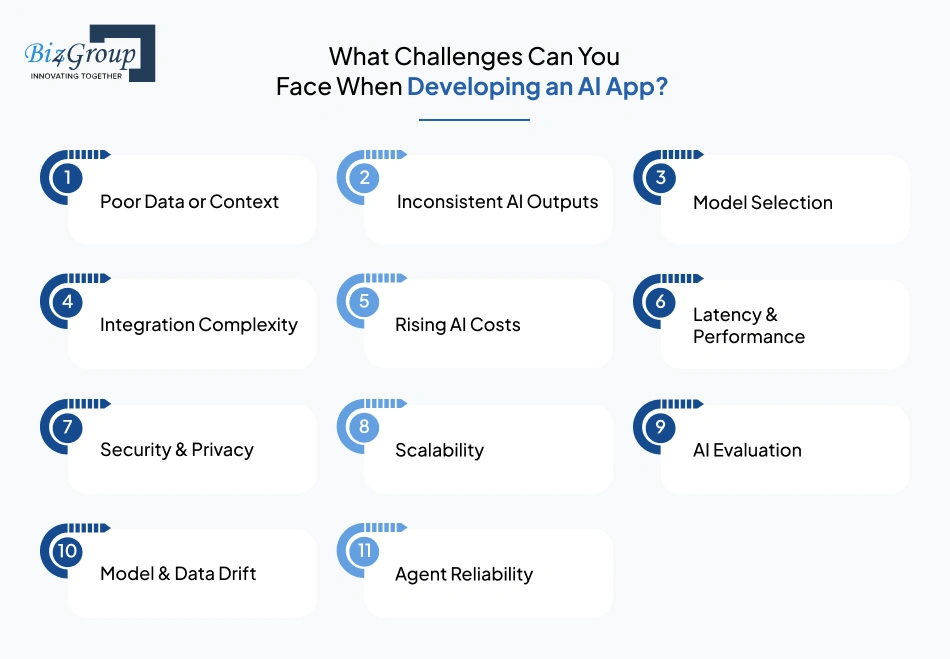
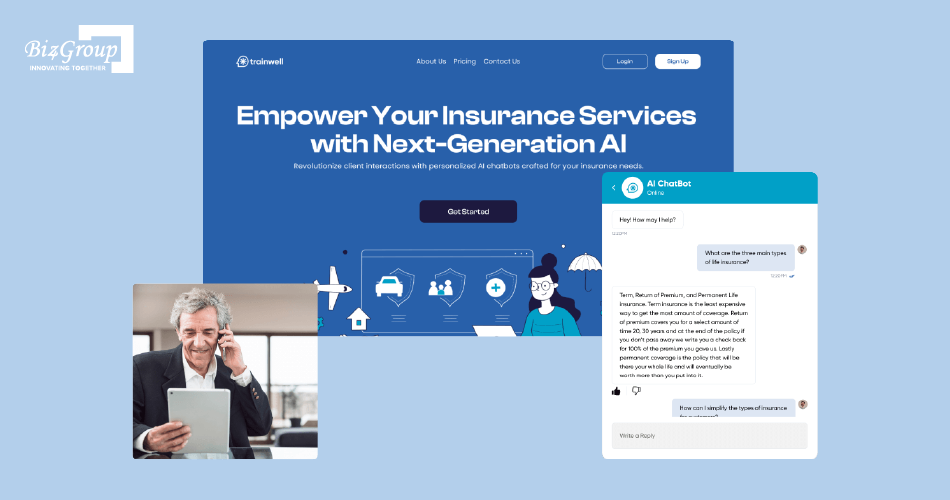
The hardest parts of AI app development often emerge when the AI layer meets real production requirements. Data quality, output reliability, integration, cost, security, and scalability can all influence how well an AI feature performs beyond the prototype stage. Our work on Insurance AI gave us a practical example of several of these challenges coming together in one application.
Insurance AI is a conversational assistant designed to help insurance agents find answers from training and insurance-related information. As we worked on the application, two requirements became particularly important: handling varied user questions while keeping responses grounded in the client’s training material, and integrating the chatbot into the client’s existing web environment without disrupting the product experience.
|
Challenge |
Why It Occurs |
How to Solve It |
|---|---|---|
|
Poor Data or Context |
Incomplete, outdated, or irrelevant information produces weak results |
Improve data quality, retrieval, access controls, and use RAG when required |
|
Inconsistent AI Outputs |
AI models can produce incorrect or unpredictable responses |
Use structured outputs, validation, guardrails, and evaluation datasets |
|
Model Selection |
Models differ in quality, latency, capabilities, and pricing |
Test suitable models against real application requirements |
|
Integration Complexity |
AI must work with existing APIs, databases, workflows, and authentication |
Keep AI services modular and separate model-specific logic from core application logic |
|
Rising AI Costs |
High request volumes, large contexts, and complex workflows increase inference costs |
Use model routing, caching, context optimization, and usage limits |
|
Latency & Performance |
Model calls, retrieval, and external APIs can slow responses |
Use streaming, caching, efficient retrieval, asynchronous processing, and suitable infrastructure |
|
Security & Privacy |
AI may access sensitive data or business systems |
Apply encryption, authorization, tenant isolation, data minimization, and least-privilege access |
|
Scalability |
More users increase inference, database, and retrieval workloads |
Use scalable infrastructure, rate limiting, queues, caching, and monitoring |
|
AI Evaluation |
Standard software tests cannot measure response quality completely |
Test accuracy, relevance, groundedness, safety, task completion, latency, and cost |
|
Model & Data Drift |
User behavior, source data, and model capabilities change over time |
Monitor production performance and update prompts, retrieval, models, or datasets |
|
Agent Reliability |
Agents can make incorrect tool calls or fail during multi-step tasks |
Restrict permissions, validate tool calls, add fallbacks, and require approval for sensitive actions |
A useful rule: solve the actual bottleneck before introducing more AI infrastructure. Poor retrieval may require better RAG, rising costs may require model routing, and slow responses may require caching or streaming. The solution should follow the problem.
How Much Does It Cost to Build an AI Application?
The cost to build an AI app in 2026 typically ranges from $20,000 for an MVP to $150,000+ for an advanced AI application. The final budget depends on the app’s complexity, AI capabilities, integrations, data requirements, security, infrastructure, and expected scale.
|
AI App Development Stage |
Estimated Cost |
Typical Scope |
|---|---|---|
|
MVP |
$20,000 – $70,000 |
Core app functionality, AI API integration, basic UI, limited workflows, authentication, and MVP validation |
|
Mid-Level |
$70,000 – $120,000 |
Custom frontend and backend, database, advanced AI features, multiple integrations, testing, deployment, and production infrastructure |
|
Advanced |
$120,000 – $150,000+ |
RAG, voice or vision AI, complex workflows, custom models, enterprise integrations, advanced evaluation, security, compliance, and high-volume inference |
These ranges are planning estimates, not fixed market prices. A simple application using an existing model API may require far less engineering than an AI application with proprietary data, real-time processing, agentic workflows, or enterprise integrations.
What Affects AI App Development Cost?
|
Cost Factor |
Impact on Cost |
|---|---|
|
AI capabilities |
RAG, computer vision, voice AI, agents, and custom models generally require more engineering than basic API integration. |
|
Application complexity |
More workflows, screens, user roles, backend services, and integrations increase development effort. |
|
Data requirements |
Data collection, cleaning, labeling, storage, retrieval, and governance add both development and infrastructure costs. |
|
Model strategy |
Existing AI APIs usually reduce upfront costs, while fine-tuning or custom model development requires additional resources. |
|
Infrastructure |
Cloud compute, inference, databases, vector storage, and third-party APIs contribute to ongoing costs. |
|
Security and compliance |
Enterprise authentication, encryption, audit trails, privacy controls, and regulatory requirements increase implementation effort. |
|
Testing and evaluation |
AI systems need evaluation for accuracy, hallucinations, latency, reliability, and edge cases alongside standard software testing. |
|
Maintenance |
Model changes, API updates, monitoring, knowledge-base updates, and application improvements create recurring costs. |
What Are the Ongoing Costs of an AI App?
Development is only the initial investment. Once the application is live, budget for:
- AI model and API usage
- Cloud infrastructure and inference
- Database and vector storage
- Third-party services
- Monitoring and observability
- Security and compliance
- Model and AI-output evaluation
- Maintenance and engineering support
For high-usage applications, inference costs can become a significant operating expense, particularly with voice, long-context processing, and agentic workflows.
How Can You Control AI App Development Costs?
- Start with the highest-value AI use case and validate it before expanding.
- Use existing models and APIs before investing in custom model development.
- Route simple tasks to lower-cost models where quality allows.
- Use caching and efficient retrieval to reduce unnecessary inference.
- Set performance and AI-cost targets before production.
- Keep the architecture flexible enough to change models or providers when requirements or pricing change.
Also Read: AI App Development Cost in 2026
What Does the Future of AI App Development Look Like?
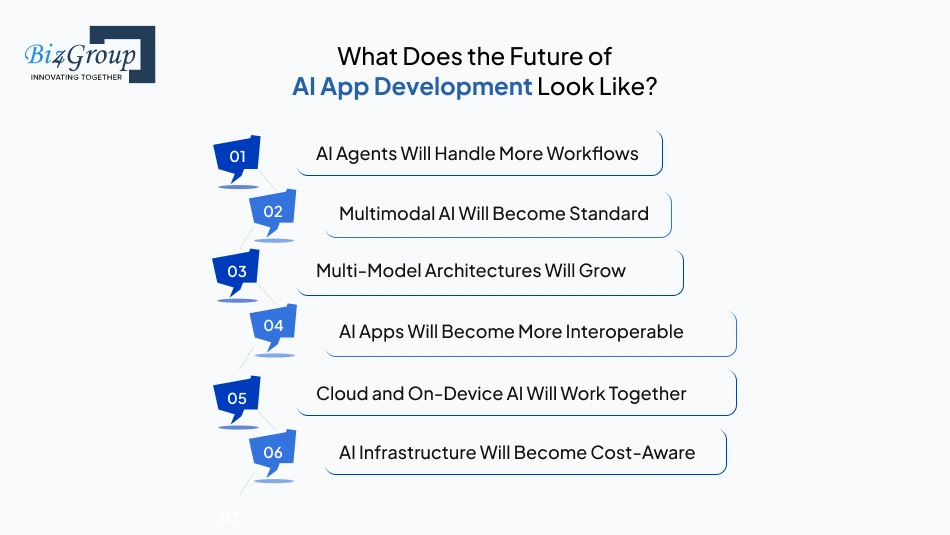
The next generation of AI applications will be shaped by better reasoning, multimodal interaction, autonomous workflows, flexible model architectures, and stronger production controls. Several are already emerging, while others are likely to become standard as AI applications mature.
1. AI Agents Will Handle More Workflows
AI apps are moving from answering questions to using tools, retrieving information, and completing multi-step tasks. Production systems will need strong permissions, human approval, audit trails, and failure handling.
2. Multimodal AI Will Become Standard
Applications will increasingly combine text, voice, images, video, and documents within a single workflow. This will create richer interfaces for areas such as healthcare, education, commerce, and enterprise support.
3. Multi-Model Architectures Will Grow
Applications will increasingly use different models for different workloads. Model routing can balance quality, latency, and inference costs while reducing dependence on a single provider.
4. AI Apps Will Become More Interoperable
Emerging standards such as MCP and A2A are making it easier for AI systems to connect with external tools, data sources, and other agents. This could make reusable integrations an important part of future AI app architecture.
5. Cloud and On-Device AI Will Work Together
Smaller models will make more local inference practical. Future applications can combine on-device processing for privacy and latency with cloud models for complex workloads.
6. AI Infrastructure Will Become Cost-Aware
As usage grows, teams will need to manage inference cost, token consumption, caching, model selection, and routing alongside conventional infrastructure costs.
For teams planning to build an AI app today, these trends point toward one practical requirement: keep the architecture flexible enough to adopt better models, tools, and AI capabilities without rebuilding the application.
Wrapping Up
The best way to approach an AI app is to treat AI as part of the product decision, not the entire product. Start by identifying the task where intelligence can create measurable value, then determine the simplest technology capable of delivering it. A model API may be enough for one application, while another may justify RAG, custom models, agentic workflows, or on-device inference. The right answer comes from the application’s requirements, data, users, and operating environment.
Our work at Biz4Group LLC, a leading AI product development company in USA, has reinforced this through projects such as Valinor, Classroom Sync, Quantum Fit, Insurance AI, and more, spanning conversational AI, voice interfaces, personalization, computer vision, and intelligent automation. Each application came with different constraints, so the technology choices evolved around the product requirements rather than a predetermined AI stack.
So, if you have an AI app idea, the next question should be what does the application genuinely need AI to accomplish, and what is the most reliable way to make that happen? Once that is clear, the architecture, technology choices, development roadmap, and investment become far easier to define.
If you’re ready to turn that idea into a production-ready AI application, connect with our AI development team to discuss the right approach for your product.
Frequently Asked Questions
1. Can I add AI to an existing app without rebuilding the entire application?
Yes. AI can usually be introduced as a separate service or application layer that communicates with your existing backend through APIs. The approach depends on how deeply the AI needs access to your product data, workflows, authentication, and business logic.
2. Do I need to train my own AI model for my application?
Usually, no. Existing foundation models and AI APIs can handle many use cases without the cost and complexity of training a model from scratch. Custom training becomes more relevant when your application requires highly specialized behavior, proprietary data handling, or performance that existing models cannot provide.
3. How do I prevent an AI application from giving unreliable answers?
Reliability comes from the surrounding system as much as the model. Depending on the use case, this can involve RAG, structured data retrieval, prompt controls, output validation, tool restrictions, evaluation datasets, and human review. Production applications should also continuously monitor real-world AI responses.
4. Should AI processing happen on the device or in the cloud?
It depends on the workload. On-device AI can improve privacy, latency, and offline functionality, while cloud inference is generally better suited to larger or more capable models. Many applications can use a hybrid architecture where each workload runs in the environment that fits it best.
5. How can I keep AI API costs under control as my user base grows?
Design cost management into the architecture from the beginning. Model routing, caching, smaller models for simpler tasks, token controls, batching, and usage monitoring can reduce unnecessary inference spend. Cost should be evaluated per user workflow rather than looking only at the price of an individual API call.
6. When does an AI app actually need RAG or a vector database?
RAG becomes useful when the application needs to answer from private, frequently changing, or domain-specific information that should not be treated as model knowledge alone. A vector database can support semantic retrieval, but it is not automatically required for every AI application.
7. How long does it take to build an AI application?
There is no single development timeline. A focused AI MVP can take 2-6 weeks for MVP, while applications involving custom models, complex integrations, compliance requirements, or advanced agentic workflows can take 6-8 weeks. Scope and production requirements are usually stronger predictors than the choice of AI model.
8. How much does it cost to build an AI app?
A realistic 2026 budget for AI app development ranges from $20,000–$70,000 for an MVP, $70,000–$120,000 for a mid-level application, and $120,000–$150,000+ for an advanced application. The final cost depends on AI capabilities, architecture, integrations, data requirements, security, infrastructure, and expected scale.
9. How do I choose an AI app development company for my project?
Look beyond a company’s list of AI technologies. Ask how it approaches use-case validation, architecture decisions, AI evaluation, security, integrations, scalability, and post-launch optimization. Reviewing comparable applications and understanding what was actually built can provide more useful evidence than generic technology claims.
10. Why should I choose Biz4Group to build my AI application?
Biz4Group brings experience across different AI application scenarios, including conversational AI, voice-based applications, personalization, computer vision, and intelligent automation. The focus is on developing the application around its actual business requirements, selecting the appropriate AI architecture, and taking the product from concept through development and deployment.
